Use the guided tester to record observations. Browser response measurements are not hardware latency or true USB polling-rate measurements.
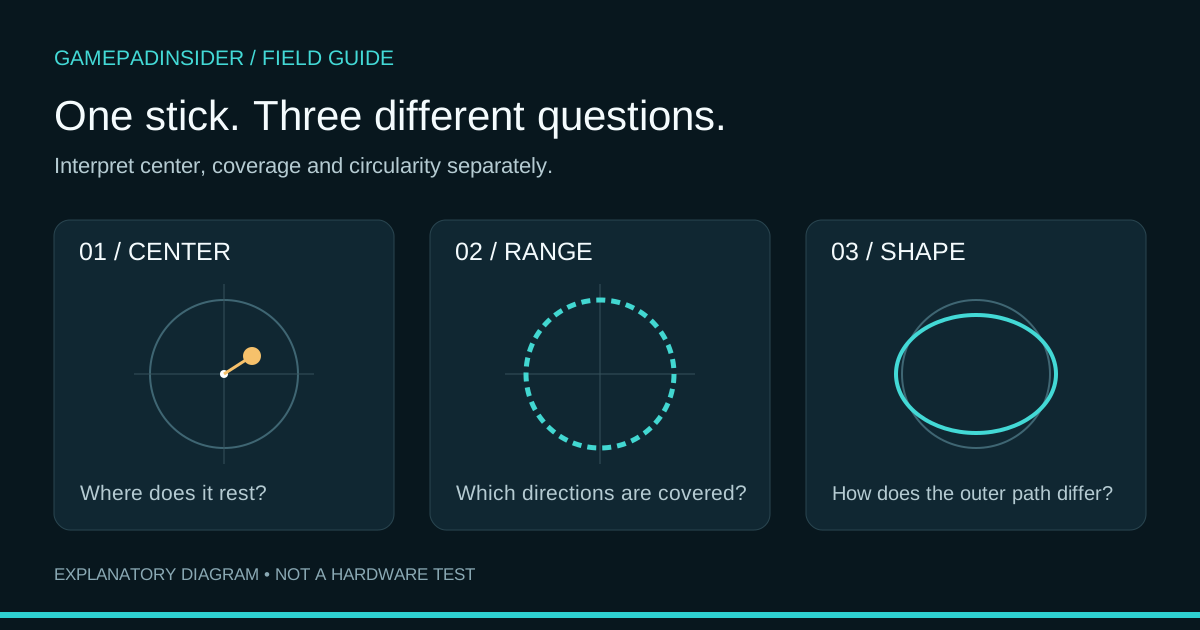
Open the controller tester →A controller stick test answers several different questions. Does the stick report movement when released? Which directions can it reach? How closely does its outer sweep follow a circular reference? Read those separately. A single percentage cannot tell you whether a controller is healthy, worn or in need of replacement.
This guide explains the current GamepadInsider stick test. Its purpose is interpretation, not an internal repair diagnosis. The examples below are constructed to make the calculations clear; they were not measured from a physical controller.
Start with the right controller and mapping
Connect your controller, keep the tester visible and press a button if it has not appeared. Select the intended device when more than one is listed. A virtual controller created by mapping software can be a different input path from the physical device you meant to inspect. MDN explains how browsers expose connected gamepads.
The Gamepad specification defines individual axis values from −1 to +1. For standard-mapped sticks, zero is the center reference, and the horizontal and vertical values describe different directions. These are reported input values, not millimetres of physical travel. See the W3C Gamepad input and layout specification.
This tester requires two standard-mapped sticks for its guided center and range checks. If it exposes only raw axes for your device, do not assume that axes 0–3 represent the same controls as a standard layout. The mapping property documents whether the browser recognizes a layout.
Three measurements, three questions
| Measurement | Question it answers | What it does not establish |
|---|---|---|
| Resting offset | How far did released-stick samples sit from the center reference? | Which sensor or mechanical component caused the offset. |
| Outer-ring coverage | Did the sweep reach the outer area in every angular sector? | Whether every physical movement was captured or the device passed a factory tolerance. |
| Circularity deviation | How far were the recorded outer radii from a unit circle? | Whether the controller is authentic, drift-free or suitable for every game. |
Resting offset: release the stick before sampling
Put the controller on a stable surface and take your thumbs off both sticks. Start the guided check, then capture the resting position. The current center capture ends automatically after roughly three seconds. Do not hold a stick near the center to make the result look better: the question is where it reports when released.
GamepadInsider calculates each sample’s distance from center as √(x² + y²). It averages those distances and displays the result as a percentage of a unit-radius reference. This is not a percentage of damage, remaining life or repair cost. The calculation and its limits are documented in our testing method.
Reported axes: x = 0.03, y = 0.04
Distance from center = √(0.03² + 0.04²) = 0.05
Displayed radial offset for this sample = 5%
Averaging radial distance matters. If a hypothetical stick alternates between +0.05 and −0.05 on one axis, its signed positions average to zero even though every sample is away from center. Averaging distance avoids that cancellation. Repeat the resting check after moving and releasing the stick to see whether the observation is consistent.
Range: finish the sweep before judging its shape
For the range capture, rotate each stick around its full outer edge at a controlled pace. Cover every direction rather than repeatedly pushing left and right. Use Finish capture after completing the sweep; the current implementation also stops a capture at 60 seconds.
The tool divides the sweep into 32 angular sectors. A sector counts toward coverage when its greatest recorded radius reaches at least 0.7. That threshold is a rule used by this test, not a manufacturer’s quality standard. A low coverage result may mean the sweep was incomplete, the reported travel was limited, or the input path behaved differently than expected.
If coverage is incomplete, repeat a deliberate full sweep under the same conditions. Do not turn the incomplete result into a hardware diagnosis. Individual axis limits also do not force every outer point onto a perfect circle: at x = 1 and y = 1, the radial distance is about 1.414.
Circularity: a comparison with a reference shape
Once all 32 sectors reach the coverage threshold, GamepadInsider averages the absolute difference between each sector’s maximum recorded radius and 1. A completed synthetic sweep with radius 1 in every sector produces zero deviation. A completed sweep with radius 0.9 throughout produces 10% deviation by this calculation.
That second example does not mean “10% worn.” Firmware, mapping, outer-range shaping and the way the test records a sweep can affect the result. Circularity is withheld as incomplete until coverage is sufficient, so a null circularity field in an unfinished range report is not the number zero.
Deadzones change response, not the meaning of the measurement
The tester’s deadzone view lets you compare movement with a visual reference. It does not write settings to the controller or your game. A game’s deadzone can suppress small input around center, but suppressing a symptom is different from proving that its cause has been repaired.
If unwanted movement also occurs in a game, compare its settings and another supported application. Use the stick-drift troubleshooting guide for the next checks. Do not apply a universal “healthy” percentage without a model-specific tolerance and a defined measurement method.
A repeatable way to use the results
- Record the controller model, connection, browser and any input-mapping software.
- Capture untouched center readings, then a complete range sweep, without changing settings halfway through.
- Repeat the same sequence and describe what remained consistent and what changed.
- Keep the report and the conditions together. Use our diagnostic report guide to interpret the exported fields.
If the tester and calibration area connect differently, read Gamepad API vs WebHID before assuming either connection has failed. Testing inputs and changing supported device settings use different paths.
Sources and verification
The axis/layout statements are based on the W3C specification and MDN mapping reference. Connection behaviour is referenced to MDN’s Gamepad guide. Capture duration, radial averaging, 32-sector coverage and circularity examples were checked against GamepadInsider’s current calculations and software tests; see the published methodology. No physical hardware result is claimed.
Try the relevant check and compare your observations with the guidance.
Stick movement · Buttons · Triggers